
Origin Configuration
速盾网络 Team
用户 → Sudun 边缘节点(缓存) → 源站服务器(您的服务器) ↓ 缓存命中:从边缘节点提供 缓存未命中:从源站获取
Your origin server can be:
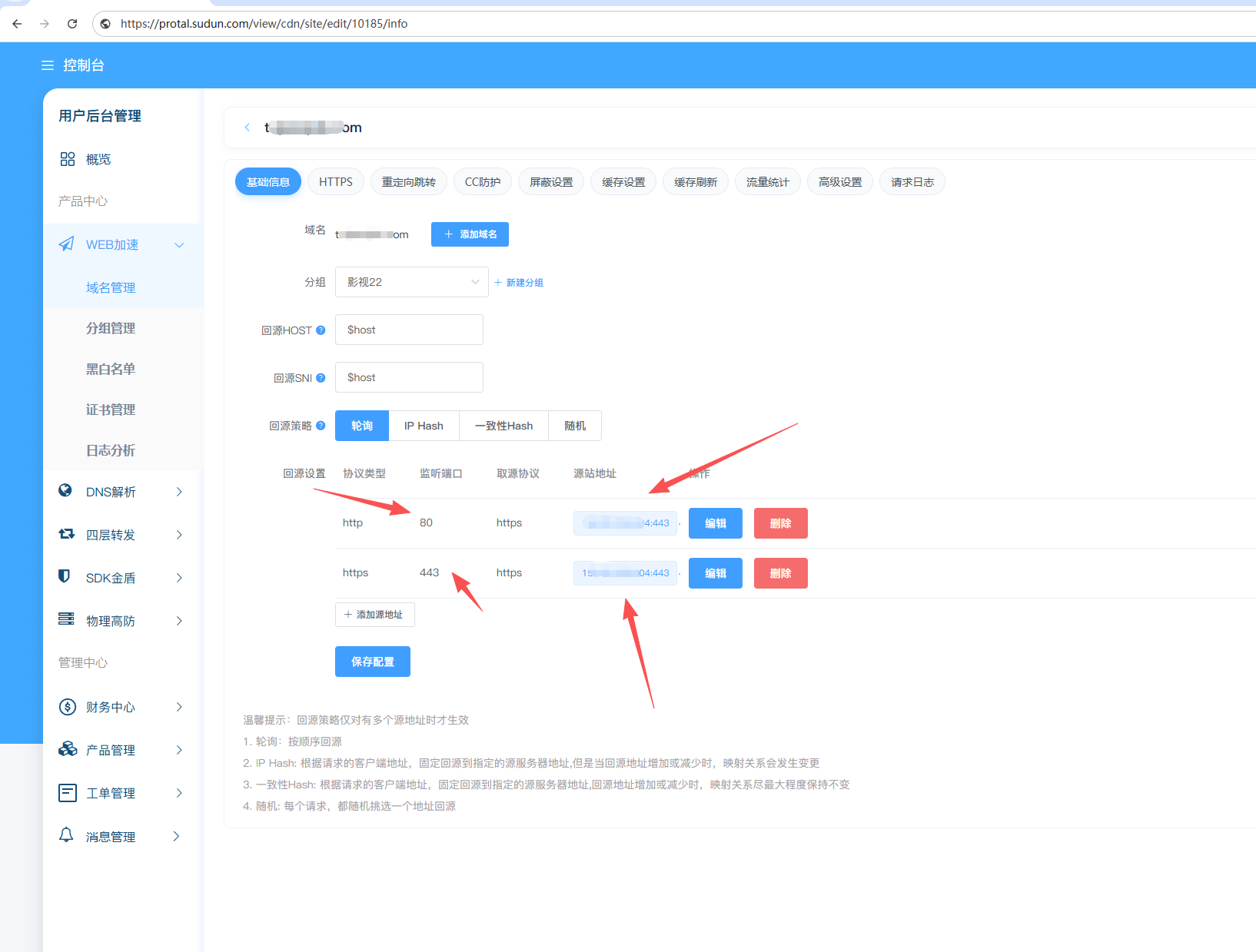
| Set item | Description | Example |
|---|---|---|
| Origin address | IP address or hostname | origin.example.com or 203.0.113.50 |
| Source port | HTTP/HTTPS port | 80, 443, or custom ports |
| Origin protocol | HTTP or HTTPS | HTTPS is recommended |
| weight | Load balancing weights | 1-100 |
Use a domain name as your origin source:
源站:origin.example.com
Benefits:
DNS Requirements:
Using a Direct IP Address:
源站:203.0.113.50
Benefits:
Notes:
边缘服务器 ──HTTPS──▶ 源站服务器
To configure the HTTPS origin server:
边缘服务器 ──HTTP──▶ 源站服务器
Warning: HTTP origin transmits data unencrypted between edge nodes and origins. Only available if the origin is on a private network with non-sensitive content or if the origin is on a private network.
The Host header tells you which site your origin is requesting. Configure this in the following situations:
| options | behavior |
|---|---|
| Accelerated domain names | The domain name that sent the user requested |
| Origin domain name | The hostname of the origin server that sends it |
| Customization | Send a custom hostname that you specify |
Example:
用户请求:www.example.com 源站服务器:origin.example.com # 选项 1:加速域名 Host: www.example.com # 选项 2:源站域名 Host: origin.example.com # 选项 3:自定义 Host: backend.example.com
Configure the timeout value for the origin connection:
| Timeout type | Default | Range | Description |
|---|---|---|---|
| Connection timeout | 5 seconds | 1-60 seconds | The time when the TCP connection was established |
| Read timeout | 30 seconds | 1-300 seconds | The time to receive the response |
| Send timeout | 30 seconds | 1-300 seconds | The time to send the request |
{ "origin": { "connect_timeout": 5, "read_timeout": 60, "send_timeout": 30 } }
Tip: For APIs that perform heavy processing, increase the read timeout.
Configure multiple origin servers for high availability:
Distribute requests evenly between origins:
源站 1:203.0.113.50(权重:50) 源站 2:203.0.113.51(权重:50)
Send more traffic to faster servers:
源站 1:203.0.113.50(权重:70) ← 70% 的流量 源站 2:203.0.113.51(权重:30) ← 30% 的流量
Use a standby origin when the primary origin fails:
源站 1:203.0.113.50(主) 源站 2:203.0.113.51(备)
Monitor origin server health to route traffic away from unhealthy servers:
| Set item | Description | Default |
|---|---|---|
| path | Check the URL path | /health |
| Interval | Check frequency | 30 seconds |
| Timeout | Response timeout | 5 seconds |
| Threshold | The number of failures before being judged to be unhealthy | 3 times |
Your origin should return:
HTTP/1.1 200 OK Content-Type: text/plain OK
Any 2xx response indicates origin health.
Origin Protection adds an additional layer of caching between the edge server and your origin server to reduce the load on the origin server:
用户 → 边缘节点 → 源站防护 → 源站服务器
Recommended Protective Locations:
| Source location | Protected location |
|---|---|
| Eastern United States | Washington, D.C |
| Western United States | Los Angeles |
| Europe | Frankfurt |
| Asia Pacific | Singapore |
Configure how Sudun handles origin redirects:
| options | behavior |
|---|---|
| Disabled | Return the redirect to the user |
| Enable | Follow the redirect at the edge node |
Request to add a custom header to the origin:
X-Forwarded-For: 客户端IP地址 X-Real-IP: 客户端IP地址 X-Forwarded-Proto: https X-Sudun-Request-ID: 唯一请求标识符
Forward query parameters to the origin:
# 启用(默认) 用户:/page?id=123 源站:/page?id=123 # 禁用 用户:/page?id=123 源站:/page
源站地址:bucket-name.s3.amazonaws.com 源站协议:HTTPS 主机头:bucket-name.s3.amazonaws.com
S3 bucket policy:
{ "Version": "2012-10-17", "Statement": [{ "Effect": "Allow", "Principal": "*", "Action": "s3:GetObject", "Resource": "arn:aws:s3:::bucket-name/*", "Condition": { "IpAddress": { "aws:SourceIp": ["Sundun IP地址范围"] } } }] }
源站地址:storage.googleapis.com 源站协议:HTTPS 路径前缀:/bucket-name
Origin server inaccessible:
The origin server is too slow to respond:
HTTPS origin certificate issues:
Configuring the origin via API:
# 获取源站配置 curl -X GET https://api.Sudun.com/v1/domains/example.com/origin \ -H "Authorization: Bearer YOUR_API_KEY" # 更新源站 curl -X PUT https://api.Sudun.com/v1/domains/example.com/origin \ -H "Authorization: Bearer YOUR_API_KEY" \ -H "Content-Type: application/json" \ -d '{ "origins": [{ "address": "origin.example.com", "port": 443, "protocol": "https", "weight": 100 }], "health_check": { "path": "/health", "interval": 30 } }'
Need help configuring your origin? Contact admin@jindun.com