
HTTPS Certificate
速盾网络 Team
Certificate options
Sudun offers a variety of certificate management solutions:
| options | Description | Applicable scenarios |
|---|---|---|
| Sudun Universal SSL | Free auto-provisioned certificates | Most websites |
| Custom certificates | Upload your own certificate | Specific compliance requirements |
| Dedicated certificates | Single-tenant certificates | Enterprise, financial services |
The universal SSL certificate will be automatically configured for all domain names on Sudun. These certificates:
Universal SSL is enabled by default. Verification method:
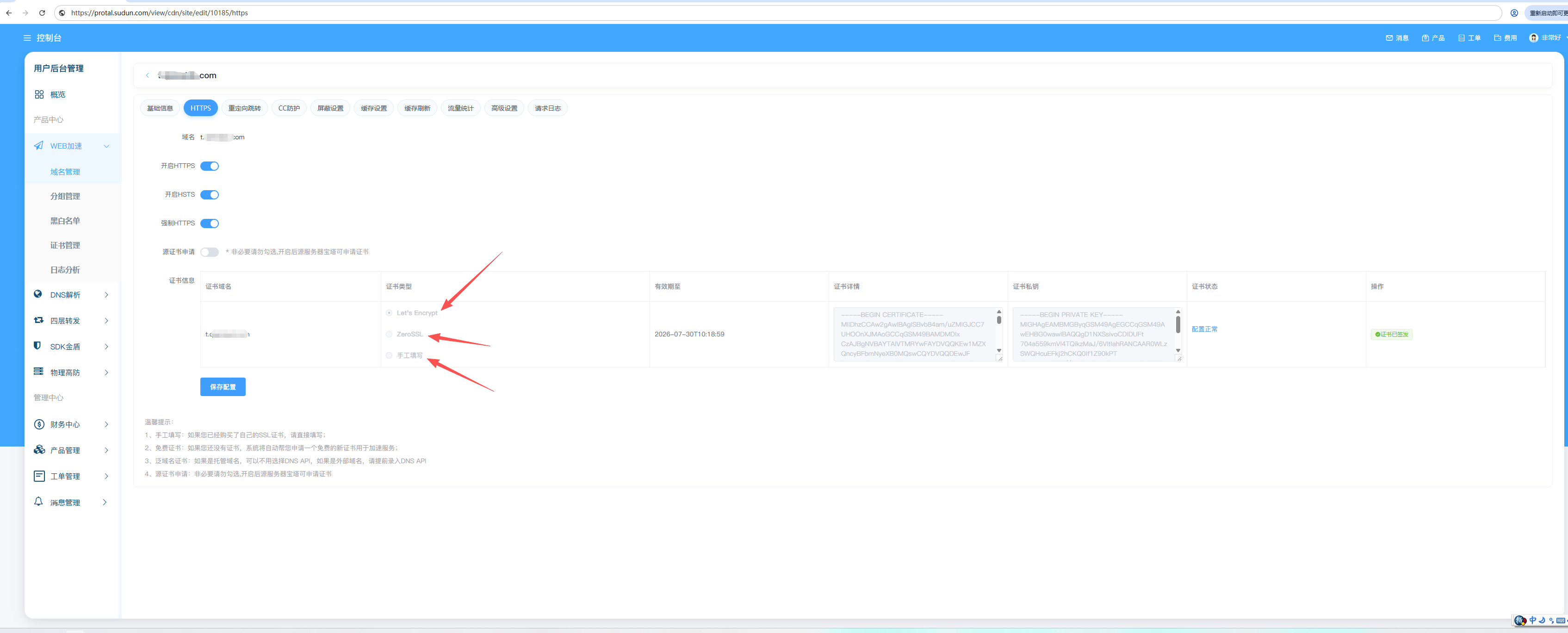
Universal SSL certificates cover:
example.com ✓ 已覆盖 www.example.com ✓ 已覆盖 *.example.com ✓ 已覆盖(通配符) sub.sub.example.com ✗ 未覆盖(多级子域名)
Note: For multi-level subdomains (e.g.), use a custom certificate or add each subdomain individually.
api.v2.example.com
Uploading your own SSL certificate gives you full control over the certificate authority, expiration date, and subject information.
| format | extension | Description |
|---|---|---|
| PEM | .pem, .crt, .cer | Base64 encoding, the most commonly used |
| PKCS#7 | .p7b, .p7c | Certificate chain format |
┌─────────────────────────────────────────────────┐ │ 证书(PEM格式) │ │ ┌───────────────────────────────────────────┐ │ │ │ -----BEGIN CERTIFICATE----- │ │ │ │ MIIFjTCCA3WgAwIBAgIRANOxciY0... │ │ │ │ -----END CERTIFICATE----- │ │ │ └───────────────────────────────────────────┘ │ │ │ │ 私钥(PEM格式) │ │ ┌───────────────────────────────────────────┐ │ │ │ -----BEGIN RSA PRIVATE KEY----- │ │ │ │ MIIEowIBAAKCAQEA0Z3VS0... │ │ │ │ -----END RSA PRIVATE KEY----- │ │ │ └───────────────────────────────────────────┘ │ │ │ │ 证书链(可选) │ │ ┌───────────────────────────────────────────┐ │ │ │ 中间证书和根证书 │ │ │ └───────────────────────────────────────────┘ │ └─────────────────────────────────────────────────┘
For custom certificates, the full certificate chain must be included:
您的证书(叶证书) ↓ 中间证书 ↓ 根证书(通常不需要)
Correct chain order:
-----BEGIN CERTIFICATE----- [您的域名证书] -----END CERTIFICATE----- -----BEGIN CERTIFICATE----- [中间证书] -----END CERTIFICATE----- -----BEGIN CERTIFICATE----- [根证书 - 可选] -----END CERTIFICATE-----
Configure the minimum acceptable TLS version:
| version | Recommended recommendations | Browser support |
|---|---|---|
| TLS 1.0 | Not recommended | Legacy only supported |
| TLS 1.1 | Not recommended | Deprecated |
| TLS 1.2 | Minimum recommended criteria | 98%+ browsers |
| TLS 1.3 | Optimal security | 95%+ browsers |
Configuration steps:
Sundun supports modern cryptographic suites by default:
TLS 1.3 cipher suite:
TLS 1.2 cipher suite:
To configure how Sundun connects to the origin server:
| mode | ↔ Edge users | ↔ Edge origin | Applicable scenarios |
|---|---|---|---|
| Close | HTTP | HTTP | Not recommended |
| Flexible | HTTPS | HTTP | The origin server does not have SSL |
| Completely | HTTPS | HTTPS | The origin server uses a self-signed certificate |
| Complete (strict) | HTTPS | HTTPS (Verified) | Production environment recommendation |
Recommendation: Production environments always use Full (Strict) mode to ensure end-to-end encryption for certificate validation.
Enforce HTTPS for all traffic:
Redirect all HTTP requests to HTTPS:
http://example.com → https://example.com(301 重定向)
Always enable in SSL/TLS → Edge Certificates → with HTTPS
Enabling HSTS instructs browsers to always use HTTPS:
Strict-Transport-Security: max-age=31536000; includeSubDomains; preload
To configure HSTS settings:
Sudun monitors certificate expiration times and sends alerts:
Check the certificate status in the console:
| state | Description |
|---|---|
| Effective | The certificate is valid and serving traffic |
| Pending | The certificate is being configured |
| Expiring soon | The certificate will expire in 30 days |
| Expired | The certificate has expired |
| Wrong | Configuration failed |
If the browser displays a mixed content warning:
//example.com/resource# 验证证书链 openssl s_client -connect example.com:443 -servername example.com # 检查链问题 openssl verify -CAfile chain.pem certificate.pem
Manage certificates via API:
# 列出证书 curl -X GET https://api.Sudun.com/v1/domains/example.com/certificates \ -H "Authorization: Bearer YOUR_API_KEY" # 上传自定义证书 curl -X POST https://api.Sundun.com/v1/domains/example.com/certificates \ -H "Authorization: Bearer YOUR_API_KEY" \ -H "Content-Type: application/json" \ -d '{ "certificate": "-----BEGIN CERTIFICATE-----...", "private_key": "-----BEGIN RSA PRIVATE KEY-----...", "chain": "-----BEGIN CERTIFICATE-----..." }'
Need help with SSL/TLS? Please contact admin@jindun.com