Common scenarios where cache needs to be cleared:
| Scenario | Purge Type | Example |
|---|---|---|
| Content updates | Single URL | Update blog posts |
| Website redesign | Clear all caches | Deploy the new CSS/JS |
| Emergency fix | URL or tag | Security patches |
| Resource version changes | Clear prefixes | /assets/v2/* |
To remove a specific URL from the cache:
https://example.com/blog/post-1
https://example.com/images/hero.jpg
https://example.com/css/styles.css
Best for: Individual content updates, targeted cache clearing
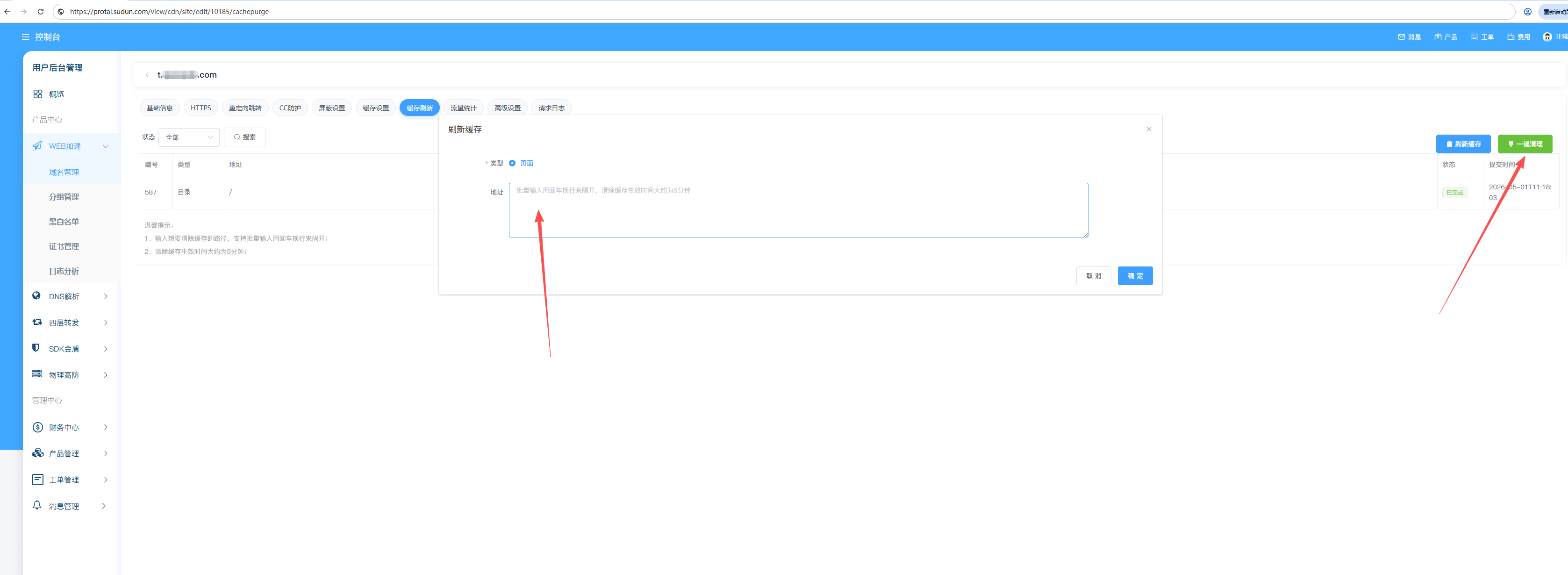
Remove all URLs that match a specific path prefix:
https://example.com/blog/*
https://example.com/images/*
https://example.com/api/v1/*
**Best for: Section updates, versioned resource deployment
Remove content associated with tags:
Tags: product-123, category-electronics, homepage
Best for: Dynamic content relationships, CMS integration
Remove all cached domain contents:
Domain: example.com
Action: Purge All
Warning: Clearing everything can cause a spike in origin server requests. Use with caution, preferably during periods of low traffic.
https://example.com/blog/Cache tags allow content-based purge without knowing the exact URL.
Add tags via the origin response header:
Cache-Tag: product-123, category-shoes, homepage
Or configure in Sudun:
{
  "cache_tags": {
    "rules": [
      {
        "match": { "path": "/products/*" },
        "tags": ["products", "catalog"]
      },
      {
        "match": { "path": "/blog/*" },
        "tags": ["blog", "content"]
      }
    ]
  }
}
# Purge all content with tag "product-123"
curl -X POST https://api.Sudun.com/v1/domains/example.com/purge \
  -H "Authorization: Bearer YOUR_API_KEY" \
  -H "Content-Type: application/json" \
  -d '{"tags": ["product-123"]}'
| Tag Type | Example | Use Case |
|---|---|---|
| Entity ID | product-123 | Purge when product updates |
| Category | category-electronics | Purge category pages |
| Content type | blog-posts | Purge all blog content |
| Template | template-homepage | Purge after template change |
After initiating a purge:
Purge Request → Sudun API → Global PoPs
                                  │
                          ┌───────┴───────┐
                          │               │
                     ~1-5 seconds    ~30 seconds
                     (most PoPs)     (all PoPs)
| Purge Type | Typical Propagation |
|---|---|
| Single URL | 1-5 seconds |
| Prefix | 5-15 seconds |
| Cache Tag | 5-15 seconds |
| Everything | 15-60 seconds |
Remove content from cache immediately:
Cache State: MISS
Origin Request: Required
Mark content as outdated, but remain available:
Cache State: STALE
Origin Request: Background revalidation
Advantages of soft purge:
# 通过 API 进行软清除
curl -X POST https://api.Sudun.com/v1/domains/example.com/purge \
  -H "Authorization: Bearer YOUR_API_KEY" \
  -d '{"urls": ["https://example.com/page"], "soft": true}'
Trigger a purge from your CMS or deployment pipeline:
# WordPress example: purge on post update
curl -X POST https://api.Sudun.com/v1/domains/example.com/purge \
  -H "Authorization: Bearer YOUR_API_KEY" \
  -d '{"tags": ["post-${POST_ID}"]}'
Clear cache after deployment:
# GitHub Actions example
- name: Purge CDN Cache
  run: |
    curl -X POST https://api.Sudun.com/v1/domains/$DOMAIN/purge \
      -H "Authorization: Bearer $YESudunPI_KEY" \
      -d '{"prefix": "https://$DOMAIN/assets/"}'
Need help with cache purging? Contact admin@jindundun.com
